
SmartSurvey Scripting
A complete guide to authoring, building, and deploying survey scripts — from creating a project to running live interviews on Android, Web, and Desktop.
What is SmartSurvey Scripting?
SmartSurvey Scripting is the process of defining a survey questionnaire using a plain-text .q script file. The script specifies every question, its type, response options, skip logic, validations, and display conditions. This script is then compiled into a script file and uploaded to the server so it can be delivered to interviewers on any supported platform.
End-to-End Workflow
Create a Project
In the SmartSurvey admin panel, go to Projects → Create New Project. Fill in the project name, type, dates, sample size, and client. The system auto-generates a unique Project Code and a Script Name.
Once the project is created, open the project page and click
Download Template
to get a pre-filled .q script file with your project details already in the header
and all mandatory questions included — ready to build on.
######################################################################

Project Name : Demo Survey
Project Code : 2601196
Script Version : 1.0.0.1
Script Name : CLIP1CCE
Scripted By : John Doe
Date : 14.09.2026

######################################################################

*QUESTION FIFSInfo *FIFS
Information Of FI and FS

#############################Start Main Script########################

*QUESTION Centre *SR
Centre Name
1:Centre1
2:Centre2

*QUESTION RespInfo *FORM
Respondent Information
1:Name *ALPHA *MANDATORY
2:Contact Number *NUMBER *MANDATORY
3:Address *ALPHA *MANDATORY *MIN 3

*QUESTION RespName *OPEN *DUMMY2 *ADDRESS1
Respondent Name
*INCLUDE RespName RespInfo.1

*QUESTION RespMobile *OPEN *DUMMY2 *ADDRESS2
Respondent Contact Number
*INCLUDE RespMobile RespInfo.2

*QUESTION RespAddress *OPEN *DUMMY2 *ADDRESS3
Respondent Address
*INCLUDE RespAddress RespInfo.3

#############################Start Main Script########################

############### End Of Main Script Part ##############################

*QUESTION Accom *OPEN *DKCS "No Accompaniment" "99"
Interview Accompanied By

*QUESTION FN *END
Interview has been completed successfully.

*QUESTION TN *TERMINATE
Interview has been Terminated.
Write the .q Script File
Open the downloaded template in any plain-text editor and add your questions between the two
#####Start Main Script##### marker lines. Use *QUESTION directives,
attribute lists, and skip logic to build the full questionnaire.
######################################################################

Project Name : Demo Survey
Project Code : 2601196
Script Version : 1.0.0.1
Script Name : CLIP1CCE
Scripted By : John Doe
Date : 14.09.2026

######################################################################

*QUESTION FIFSInfo *FIFS
Information Of FI and FS

#############################Start Main Script########################

*QUESTION Centre *SR
Centre Name
1:Centre1
2:Centre2

*QUESTION RespInfo *FORM
Respondent Information
1:Name *ALPHA *MANDATORY
2:Contact Number *NUMBER *MANDATORY
3:Address *ALPHA *MANDATORY *MIN 3

*QUESTION RespName *OPEN *DUMMY2 *ADDRESS1
Respondent Name
*INCLUDE RespName RespInfo.1

*QUESTION RespMobile *OPEN *DUMMY2 *ADDRESS2
Respondent Contact Number
*INCLUDE RespMobile RespInfo.2

*QUESTION RespAddress *OPEN *DUMMY2 *ADDRESS3
Respondent Address
*INCLUDE RespAddress RespInfo.3

-- ── SCREENER ─────────────────────────────────────────────────────

*QUESTION S1 *SR
S1. Are you the primary decision maker for paint purchases?
1:Yes
2:No

*IF [S1=2] *GOTO TN  -- terminate if not decision maker

-- ── MAIN QUESTIONS ───────────────────────────────────────────────

*QUESTION Q1 *SR
Q1. Which paint brand do you use most often?
1:Berger
2:Asian Paints
3:Nippon
4:Dulux
5:Other

*QUESTION Q2 *MR *MAX 3
Q2. Which of the following factors influence your purchase? (Select up to 3)
1:Price
2:Colour Range
3:Durability
4:Brand Trust
5:Availability

*QUESTION Q3 *NUMBER *MIN 18 *MAX 99
Q3. What is your age?

*IF [Q3<25] *GOTO TN  -- terminate if under 25

*GRIDLIST "GQ4"
1:Very Dissatisfied
2:Dissatisfied
3:Neutral
4:Satisfied
5:Very Satisfied

*QUESTION Q4 *GRIDSR *USEGRIDLIST "GQ4"
Q4. Please rate your satisfaction with your main brand on each aspect.
1:Coverage
2:Durability
3:Price / Value
4:Customer Support

*QUESTION Q5 *OPEN
Q5. Any additional comments about your paint brand experience?

############### End Of Main Script Part ##############################

*QUESTION Accom *OPEN *DKCS "No Accompaniment" "99"
Interview Accompanied By

*QUESTION FN *END
Interview has been completed successfully.

*QUESTION TN *TERMINATE
Interview has been Terminated.
Build the Script
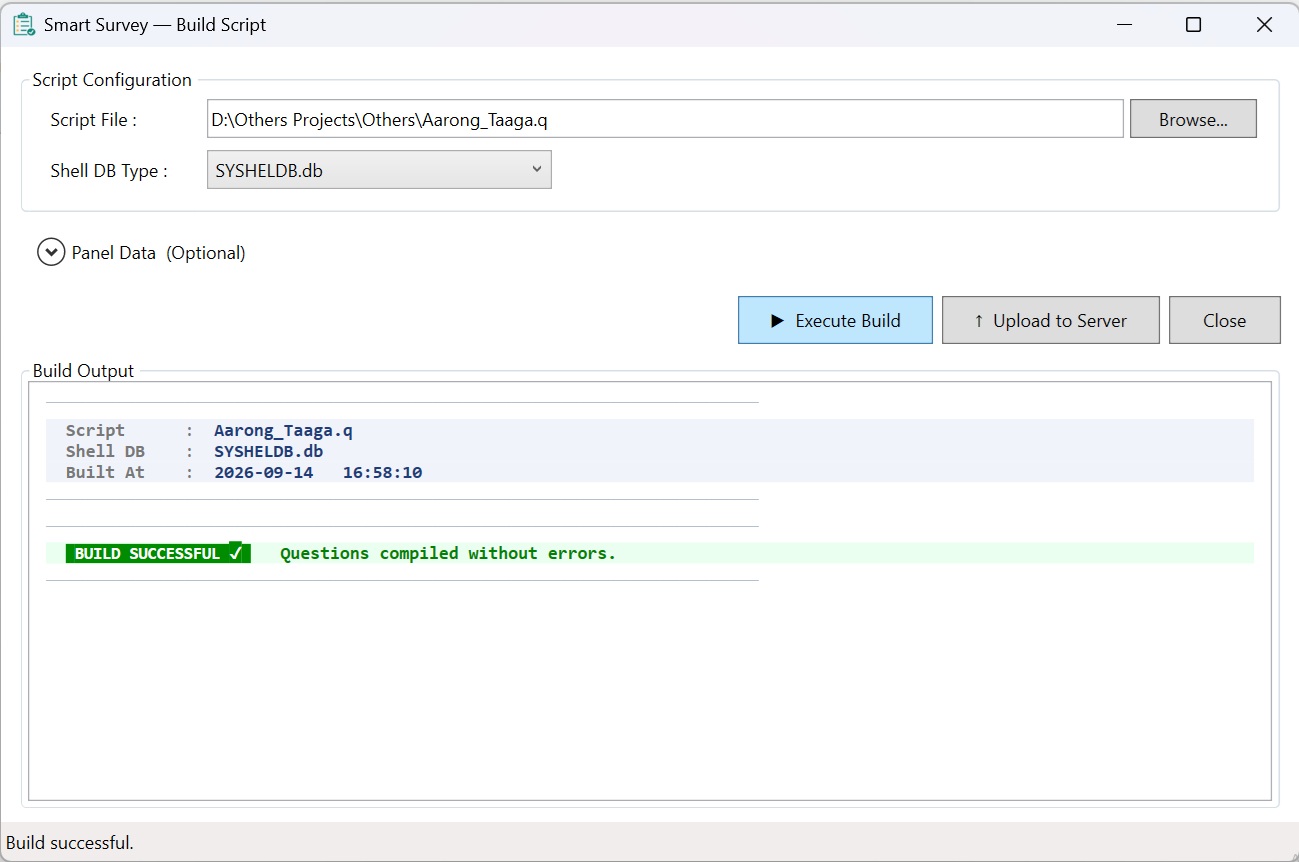
Open the SmartSurvey Desktop Builder (Windows application). Browse to your
.q file, select the Shell DB Type, then click ▶ Execute Build.
The builder validates all question IDs, logic references, mandatory fields, and attribute lists.
A successful build produces a compiled script file ready for upload.
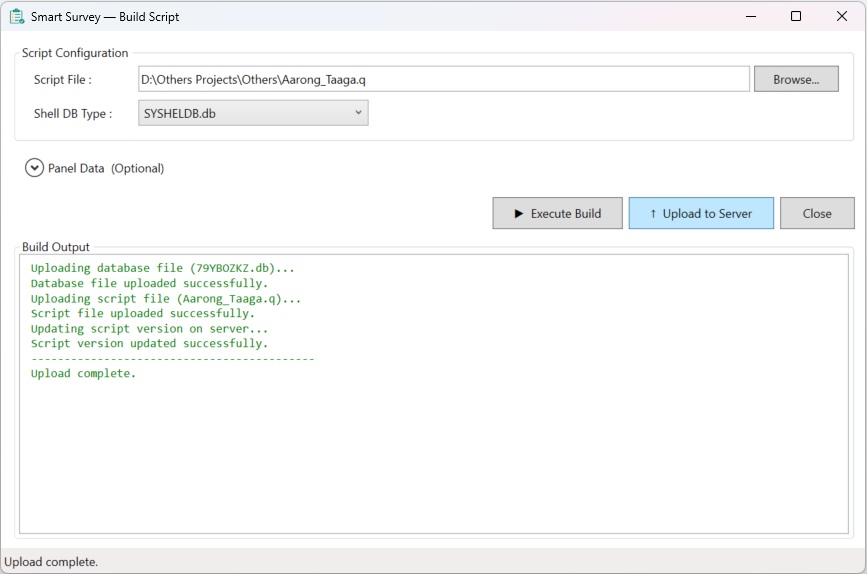
A single compiled script is used across all three platforms — Android, Web, and Desktop. Once the build is complete, click ↑ Upload to Server to push it directly.
Upload to SmartSurvey
In the admin panel, open the project and click Upload Script.
Upload both the compiled script file and the original .q source file.
Both are stored on the server and the survey is immediately ready to run.
.q source file, then click Upload.
Run the Survey — Choose Your Platform
Once the script is uploaded, the survey can be delivered via three methods. All platforms use the same compiled script and write responses to the same project tables.
intv_method=1 → CAPI (Android) intv_method=2 → CAWI (Web) intv_method=3 → Desktop (CATI)Interview Platforms
CAPI
Computer-Assisted Personal Interview.
Field interviewers conduct face-to-face interviews using the SmartSurvey Android app.
The compiled script is synced to the device. Responses are stored locally and
synced back to the server. Supports GPS capture, photo upload, and audio recording.
CAWI
Computer-Assisted Web Interview.
Respondents complete the survey themselves via a web browser. A unique survey link
is distributed to each respondent. The server reads the compiled script and renders
the questionnaire as a web form. No app installation required.
Desktop (CATI)
Computer-Assisted Telephone Interview.
Interviewers conduct phone interviews from a desktop workstation. The survey
runs in a browser on the desktop, with the interviewer entering responses while
speaking to the respondent over the phone.
The .q Script File Format
A .q file is a plain-text questionnaire script organized into four main parts:
| Section | Purpose | Example |
|---|---|---|
| Header Block | Project metadata — name, code, version, author, date (comment lines starting with #) |
# Project Name : Demo Survey |
| List Definitions | Named attribute lists (*LIST) and grid scale lists (*GRIDLIST) reusable across multiple questions |
*LIST "BrandList" |
| Question Definitions | Each question defined with *QUESTION [QId] [*Type], question text, and numbered attributes |
*QUESTION Q1 *SR |
| Logic Rules | Skip logic (*IF ... *GOTO), attribute filters (*INCLUDE, *EXCLUDE), and auto-fill expressions |
*IF Q1=2 *GOTO Q5 |
Mandatory Questions
Every script must include the following four questions. The build will fail if any are missing.
Respondent Name — Open text question, typically hidden with *DUMMY2 *ADDRESS1 and auto-filled from a *FORM question.
Respondent Phone Number — Numeric or open question, hidden with *DUMMY2 *ADDRESS3 and auto-filled from a *FORM question.
Survey Centre / Location — Single-response question listing the valid survey locations. Used for quota management and interview routing.
Field Interviewer / Supervisor Info — Special type *FIFS. Captures interviewer identity, supervisor code, and assignment metadata. Required for all CAPI and Desktop surveys.
Key Scripting Concepts
| Concept | Meaning | Example |
|---|---|---|
| Q Reference | Reference a question by its QId as defined in the script | Q1, Q12, Centre |
| Attribute Value | Numeric code for a response option (the number before the colon in the script) | Q1=2 means code 2 was selected |
| AND operator | & — both conditions must be true | Q1=1&Q2=2 |
| OR operator | | — at least one condition must be true | Q1=1|Q1=2 |
| Comparison | Compare a Q value to a number or attribute code | Q3>=18 |
| Function call | Built-in functions for counts, sums, dates, and text | numberofresponse[Q2]>=2 |
| Skip Logic | Conditional routing to any question using *IF ... *GOTO | *IF Q1=3 *GOTO SurveyEnd |
| intv_type | Interview mode: 1 = Live (production), 2 = Test | Use type 2 for testing before go-live |
Explore the Reference Sections
Question Types
SmartSurvey supports 21 question types identified by a numeric qtype code. Use the correct type when referencing questions in logic expressions — some functions apply only to specific types.
Quick Reference
| ID | Name | Category | Directive | Use in Expressions |
|---|---|---|---|---|
| 1 | Single Response | Choice | *SR | Q1=value |
| 2 | Multiple Response | Choice | *MR | Q2=value, numberofresponse[Q2] |
| 3 | Text Response | Text | *OPEN | lengthof[Q3], substrof[Q3,0,2] |
| 4 | Numeric Response | Numeric | *NUMBER | Q4>=18, valueof[Q4] |
| 5 | Ranking | Choice | *RANK | valueof[Q5.1] |
| 6 | Image | Media | *PICT | No response — display only |
| 7 | Single Grid | Grid | *GRIDSR | valueof[Q7.row] |
| 8 | Multiple Grid | Grid | *GRIDMR | numberofresponse[Q8] |
| 9 | Media | Media | *INFO | No response — stimulus only |
| 12 | List Text | Text | *OPEN (list) | lengthof[Q12] |
| 13 | List Numeric | Numeric | *NUMBER (list) | sumof[Q13], totalof[Q13] |
| 14 | Date | Date/Time | *DATE | datevalueof[Q14] |
| 15 | Time | Date/Time | *TIME | timediffof[Q15,Q16] |
| 16 | Capture Image | Media | *CAPTUREIMAGE | No expression — CAPI only |
| 17 | Numeric with Total | Numeric | *NUMLISTTOTAL | totalof[Q17]=100 |
| 22 | AutoComplete | Choice | *SR (autocomplete) | Q22=value |
| 24 | Dropdown | Choice | *SR (dropdown) | Q24=value |
| 32 | Scale N-Grid | Grid | *GRIDSR (scale) | valueof[Q32.row], maxvalueof[Q32] |
| 40 | MaxDiff | Advanced | *MAXDIFF | Best/worst coding — no direct expression |
| 41 | GPS Capture | Geo | *GPS | No expression — CAPI only |
| 48 | Compound | Advanced | *COMPOUND | Per sub-question reference |
| 49 | Info / Display | Display | *INFO | No response — display only |
Question Type Details & Examples
Presents a list of options where the respondent selects exactly one. The response is stored as the selected attribute_value code. Use in expressions by comparing Qx=code.
*QUESTION Q1 *SR
What is your gender?
1:Male
2:Female
3:Prefer not to say
Q1=1           -- respondent is Male
Q1=2           -- respondent is Female
Q1!=3          -- respondent did not choose "Prefer not to say"
Q1=1|Q1=2    -- Male or Female (either)
Presents a list of options where the respondent can select one or more. Check for a specific code with Qx=code, or count total selections with numberofresponse[Qx].
*QUESTION Q2 *MR
Which of the following brands are you aware of?
1:Berger
2:Asian Paints
3:Nippon
4:Dulux
99:None of the above  *DKCS "None" "99"
Q2=1                            -- Berger was selected
Q2=1&Q2=2                     -- both Berger AND Asian Paints selected
numberofresponse[Q2]>=2         -- at least 2 brands selected
numberofresponse[Q2]=0         -- nothing selected (or only "None")
Free-text input field. Use lengthof[] to enforce character limits and substrof[] to inspect content. Add *MANDATORY to require a non-empty answer.
*QUESTION Q3 *OPEN *MANDATORY
Please describe your main reason for choosing this brand.
lengthof[Q3]>=10              -- at least 10 characters entered
lengthof[Q3]=11               -- exactly 11 chars (e.g. mobile number)
substrof[Q3,0,2]="01"        -- starts with "01" (BD mobile prefix)
Single numeric entry field. Use *MIN and *MAX to constrain the allowed range. Reference directly in expressions with comparison operators.
*QUESTION Q4 *NUMBER *MIN 15 *MAX 99
How old are you? (years)
Q4>=18                        -- adult (18 or older)
Q4>=18&Q4<=35              -- 18–35 age bracket
Q4<18                         -- under 18 → screen out
valueof[Q4]>=18               -- same using valueof[] function
Respondent orders items by preference (1st, 2nd, 3rd…). Use valueof[Qx.n] to retrieve the attribute code at rank position n.
*QUESTION Q5 *RANK
Please rank these brands from most preferred (1) to least preferred (3).
1:Berger
2:Asian Paints
3:Nippon
valueof[Q5.1]=2             -- 1st choice is Asian Paints (code 2)
valueof[Q5.2]=1             -- 2nd choice is Berger (code 1)
valueof[Q5.1]!=3            -- top choice is not Nippon
Matrix question with rows (sub-questions) and columns (scale options). Single Grid allows one column selection per row; Multiple Grid allows several. Use valueof[Qx.row] to read a specific row's answer.
*GRIDLIST "SatisfactionScale"
1:Very Dissatisfied
2:Dissatisfied
3:Neutral
4:Satisfied
5:Very Satisfied

*QUESTION Q7 *GRIDSR *USEGRIDLIST "SatisfactionScale"
Rate your satisfaction with each aspect:
1:Product Quality
2:Price / Value
3:Customer Service
4:Delivery Speed
valueof[Q7.1]>=4             -- row 1 (Product Quality) rated 4 or 5
valueof[Q7.3]=1             -- row 3 (Customer Service) rated "Very Dissatisfied"
valueof[Q7.2]>=4 & valueof[Q7.4]>=4   -- rows 2 and 4 both rated 4 or above
Collects a text or numeric entry for each row/attribute in the list. List Numeric entries can be summed with sumof[] or validated with totalof[].
*QUESTION Q13 *NUMBER *MIN 0 *MAX 100
What percentage of your paint purchases are from each channel?
1:Hardware Store
2:Distributor
3:Direct from Brand
4:Online
totalof[Q13]=100              -- all channel percentages sum to 100
valueof[Q13.1]>=50           -- Hardware Store accounts for 50%+ of purchases
Date picker input (YYYY-MM-DD). Use datevalueof[] to convert the date to a comparable numeric value (YYYYMMDD format) for age checks and eligibility filters.
*QUESTION Q14 *DATE
What is your date of birth?
datevalueof[Q14]<20080101     -- born before 2008 (aged 18+ in 2026)
datevalueof[Q14]>=19710101     -- born 1971 or later
datevalueof[Q14]>=19710101&datevalueof[Q14]<=20011231
-- target age 25–55 (born 1971–2001)
Time picker input (HH:MM, 24-hour). Typically used as a hidden question auto-filled with timeof[Now] to record interview start/end times. Use timediffof[] for duration calculations.
*QUESTION QStartTime *TIME *DUMMY2
*INCLUDE QStartTime TimeOf[Now]    -- auto-fill at interview start

*QUESTION QEndTime *TIME *DUMMY2
*INCLUDE QEndTime TimeOf[Now]      -- auto-fill at interview end
timediffof[QStartTime,QEndTime]>=20   -- interview at least 20 minutes
timediffof[QStartTime,QEndTime]<=90   -- interview within 90 minutes
Multiple numeric fields where entries must sum to a target (usually 100). The running total is shown to the respondent in real time. Validate the total with totalof[].
*QUESTION Q17 *NUMLISTTOTAL *MIN 0 *MAX 100
Distribute 100 points across these paint attributes based on importance:
1:Coverage
2:Durability
3:Colour Range
4:Price
5:Brand Trust
totalof[Q17]=100               -- all entries must sum to exactly 100
valueof[Q17.1]>=30            -- Coverage given 30+ points
Both are single-response variants. AutoComplete (22) lets the respondent search a large list by typing. Dropdown (24) shows a select list. Both return one attribute_value code, used identically to a regular *SR in expressions.
*QUESTION Q22 *SR    -- AutoComplete (large brand list)
Which brand of cigarette did you purchase today?
*USELIST "CigaretteBrandList"

*QUESTION Q24 *SR    -- Dropdown
Select your division:
1:Dhaka   2:Chittagong   3:Rajshahi   4:Sylhet
Q22=5              -- brand code 5 selected via AutoComplete
Q24=1              -- Dhaka division selected in Dropdown
Q24=1|Q24=2     -- Dhaka or Chittagong
An N-point rating scale applied per row. Common for NPS, satisfaction ratings, and attribute evaluation grids. Use valueof[Qx.row] to read any row's score.
*GRIDLIST "Scale10"
0:0  1:1  2:2  3:3  4:4  5:5
6:6  7:7  8:8  9:9  10:10

*QUESTION Q32 *GRIDSR *USEGRIDLIST "Scale10"
On a scale of 0–10, how likely are you to recommend each brand?
1:Berger
2:Asian Paints
3:Nippon
valueof[Q32.1]>=9             -- Berger NPS promoter (9 or 10)
valueof[Q32.1]<=6             -- Berger NPS detractor (0–6)
maxvalueof[Q32]>=9            -- at least one brand rated 9+
maxvalueindexof[Q32]=2        -- Asian Paints received the highest NPS
Field capture questions — CAPI mode only. Capture Image (16) opens the device camera or file browser to attach a photo. GPS (41) captures the device's current latitude and longitude. Neither produces a value usable in expressions.
*QUESTION QPhoto *CAPTUREIMAGE
Please take a photo of the shop front.

*QUESTION QLocation *GPS
-- Captures GPS coordinates automatically (no question text needed)
Display-only block — shows text, instructions, or section introductions to the respondent. No response is captured. Supports HTML formatting. Use display conditions to show/hide info blocks dynamically.
*QUESTION QIntro *INFO
<b>INTERVIEWER:</b> Read the following introduction to the respondent.<br>
Thank you for agreeing to participate in this survey.
It will take approximately 15 minutes.

*QUESTION QSectionBreak *INFO
<b>SECTION 2: BRAND USAGE</b>
The following questions are about your usage of paint products.
Operators
Operators form the backbone of every condition expression. SmartSurvey supports 6 comparison operators and 2 logical connectors.
Comparison Operators
Logical Connectors
Operator Precedence
Expressions are evaluated left to right. There is no bracket grouping — structure your conditions accordingly.
-- Evaluated left to right:
Q1=1&Q2=2|Q3=3
-- Reads as: ((Q1=1 AND Q2=2) OR Q3=3)

-- To apply OR first, put OR conditions together:
Q1=1|Q1=2&Q2=3
-- Reads as: Q1=1 OR Q1=2, then AND Q2=3
Built-in Functions
Functions allow you to compute derived values from responses — counting selections, summing numbers, extracting date parts, and more.
functionname[Qx] or functionname[Qx,param]. Function names are case-sensitive and must be written in lowercase.Returns the number of responses/selections made to a question. Most useful for Multiple Response (type 2) questions to enforce minimum/maximum selection counts.
| Parameter | Type | Description |
|---|---|---|
Qx | Question ref | The question to count responses for |
numberofresponse[Q2]>=2        -- at least 2 options selected in Q2
numberofresponse[Q2]=3          -- exactly 3 selected
numberofresponse[Q2]<=5          -- no more than 5 selected
Returns the sum of all numeric entries in a question. Applies to Numeric with Total (type 17) and List Numeric (type 13) questions where multiple values are entered.
| Parameter | Type | Description |
|---|---|---|
Qx | Question ref | Numeric or numeric-total question |
totalof[Q17]=100               -- budget allocation must sum to 100
totalof[Q17]<=500              -- total spend does not exceed 500
Returns the value of the nth response/attribute for a question. Used for Ranking (type 5), Grid questions, and Scale N-Grid (type 32) to get a specific position's value.
| Parameter | Type | Description |
|---|---|---|
Qx | Question ref | The question to read from |
n | Integer | The position index (1-based) |
valueof[Q5.1]=3              -- first-ranked item in Q5 is brand code 3
valueof[Q32.2]>=4            -- row 2 of scale grid rated 4 or above
Returns the modulo (remainder) of a question's value divided by the divisor. Useful for alternating questionnaire versions or rotation logic.
| Parameter | Type | Description |
|---|---|---|
Qx | Question ref | Numeric question |
divisor | Integer | The divisor number |
modof[Q1,2]=0               -- respondent ID is even → show version A
modof[Q1,2]=1               -- respondent ID is odd  → show version B
modof[Q1,3]=0               -- every 3rd respondent → rotation group C
Returns the sum of values across multiple questions. Use when respondents split a budget or allocation across separate questions and you need to validate the combined total.
| Parameter | Type | Description |
|---|---|---|
Qx, Qy, … | Question refs | Two or more numeric questions, comma-separated |
sumof[Q10,Q11,Q12]=100     -- Q10+Q11+Q12 must equal 100%
sumof[Q10,Q11]<=1000          -- combined spend ≤ 1000 BDT
Extracts a substring from a text response. Useful for parsing structured codes, phone numbers, or postal codes entered in text fields.
| Parameter | Type | Description |
|---|---|---|
Qx | Question ref | Text question to extract from |
start | Integer | Start position (0-based) |
length | Integer | Number of characters to extract |
substrof[Q3,0,2]="01"       -- phone starts with "01" (BD mobile)
substrof[Q3,0,4]="1234"     -- first 4 digits match a district code
Returns the character length of a text response. Use to enforce minimum or maximum word/character count for open-ended questions.
| Parameter | Type | Description |
|---|---|---|
Qx | Question ref | Text question to measure |
lengthof[Q3]>=10               -- response must be at least 10 characters
lengthof[Q3]<=500              -- response cannot exceed 500 characters
lengthof[Q3]=11               -- exactly 11 chars (e.g. phone number)
Parses and returns a comparable numeric date value from a Date question (type 14). Allows date comparisons like age thresholds or eligibility cutoffs.
| Parameter | Type | Description |
|---|---|---|
Qx | Question ref | Date question (type 14) |
datevalueof[Q14]<20060101      -- born before 2006 (aged 18+)
datevalueof[Q14]>=19590101     -- born in 1959 or later
Returns the difference in minutes between two Time questions. Use for interview duration checks, time-window validations, or scheduling logic.
| Parameter | Type | Description |
|---|---|---|
Qx | Question ref | Start time question (type 15) |
Qy | Question ref | End time question (type 15) |
timediffof[Q15,Q16]>=20       -- interview lasted at least 20 min
timediffof[Q15,Q16]<=90       -- interview completed within 90 min
Arithmetic Functions
Returns the result of subtracting Qy from Qx. Use to compute the difference between two numeric question values.
| Parameter | Type | Description |
|---|---|---|
Qx | Question ref | Minuend (value to subtract from) |
Qy | Question ref | Subtrahend (value to subtract) |
subtractof[Q10,Q11]>=0        -- Q10 is greater than or equal to Q11
subtractof[Q10,Q11]<=100       -- difference does not exceed 100
Returns the product of Qx multiplied by Qy. Useful for computing weighted scores or scaled values from two numeric inputs.
| Parameter | Type | Description |
|---|---|---|
Qx | Question ref | First factor |
Qy | Question ref | Second factor |
multiplyof[Q5,Q6]>=1000 -- product of Q5 and Q6 is at least 1000
Returns the result of dividing Qx by Qy. Use for ratio comparisons and percentage calculations. Ensure Qy cannot be zero to avoid division errors.
| Parameter | Type | Description |
|---|---|---|
Qx | Question ref | Dividend |
Qy | Question ref | Divisor (must not be zero) |
divideof[Q10,Q11]>=2          -- Q10 is at least double Q11
divideof[Q10,Q11]<=1          -- Q10 is not greater than Q11
Advanced Value Functions
Returns the maximum value across all entries in a grid or multi-entry numeric question. Use to find the highest rating or score given by the respondent.
| Parameter | Type | Description |
|---|---|---|
Qx | Question ref | Grid or multi-numeric question |
maxvalueof[Q20]>=4             -- at least one row was rated 4 or above
maxvalueof[Q20]=5              -- the highest rating given was exactly 5
Returns the 1-based row/position index of the maximum value in a grid or multi-entry question. Use to identify which item received the highest rating.
| Parameter | Type | Description |
|---|---|---|
Qx | Question ref | Grid or multi-numeric question |
maxvalueindexof[Q20]=2        -- row 2 has the highest rating in Q20
maxvalueindexof[Q20]!=1        -- the top-rated item is not row 1
Wraps a literal text value as a string for comparison. Required when comparing a question response or system value against a text constant — for example when using useridof[] or languageof[].
| Parameter | Type | Description |
|---|---|---|
value | String literal | The text constant to compare against (no quotes needed) |
useridof[Interview]=stringof[dhaka_fi01]   -- interviewer is dhaka_fi01
languageof[Interview]=stringof[bn]          -- interview language is Bengali
System & Admin Functions
Returns the login username of the currently logged-in field interviewer. Use to route different interviewers to different question sets, sample blocks, or geographic quotas.
| Parameter | Type | Description |
|---|---|---|
Interview | Keyword | Fixed keyword — always write exactly Interview |
stringof[].useridof[Interview]=stringof[dhaka_fi01] -- route Dhaka FI to Dhaka sample useridof[Interview]=stringof[ctg_fi01] -- route Chittagong FI to Ctg sample useridof[Interview]!=stringof[supervisor1] -- exclude supervisor account
Returns the language code of the current interview session. Use to conditionally include language-specific attributes or show language-appropriate content.
| Parameter | Type | Description |
|---|---|---|
Interview | Keyword | Fixed keyword — always write exactly Interview |
en, bn, ar). Always compare using stringof[].languageof[Interview]=stringof[bn] -- session is in Bengali languageof[Interview]=stringof[en] -- session is in English -- Often used with *INCLUDE to load language-specific attribute lists
Captures the current system time at the moment the question is reached. Used as an auto-fill value to record interview start and end times for Length of Interview (LOI) calculations. Always pair with timediffof[] for duration checks.
| Parameter | Type | Description |
|---|---|---|
Now | Keyword | Fixed keyword — always write exactly Now |
timeof[Now] is used as an auto-fill value on a hidden Time question — not inside a condition expression. The captured time question is then referenced in timediffof[].-- Auto-record interview start time into hidden QStartTime *INCLUDE QStartTime TimeOf[Now] -- Auto-record end time into QEndTime (at end of survey) *INCLUDE QEndTime TimeOf[Now] -- Validate interview duration is between 20 and 90 minutes timediffof[QStartTime,QEndTime]>=20&timediffof[QStartTime,QEndTime]<=90
Captures today's date at the moment the question is reached. Used to auto-record the interview date for quality control and tracking. Written as an auto-fill on a hidden Date question.
| Parameter | Type | Description |
|---|---|---|
Today | Keyword | Fixed keyword — always write exactly Today |
-- Auto-record today's date into hidden QDate (Date, type 14)
*INCLUDE QDate DateOf[Today]
Skip Logic
Skip logic controls which question the respondent goes to next based on their answers. Conditions are written as expressions and evaluated after each question is answered.
How Skip Logic Works
Each skip rule has three parts: an IF condition, a THEN destination (question to jump to if true), and an ELSE destination (question if false). If no ELSE is set, the survey continues to the next sequential question.
| Field | Description | Example Value |
|---|---|---|
if_condition | The expression to evaluate | Q1=2|Q1=3 |
then_value | Question ID to jump to when condition is TRUE | Q10 |
else_value | Question ID to jump to when condition is FALSE (optional) | Q5 |
Skip Logic Patterns
-- 1. Skip to end if respondent is screened out
IF:   Q1=2
THEN: END

-- 2. Skip a block for non-users
IF:   Q3!=1
THEN: Q10
ELSE: Q4

-- 3. Multiple selections trigger next module
IF:   numberofresponse[Q5]>=3
THEN: Q20

-- 4. Age-based routing
IF:   Q2>=18&Q2<=35
THEN: Q15

-- 5. Skip based on ranked first choice
IF:   valueof[Q6.1]=4
THEN: Q30
Validation Rules
Validation expressions are evaluated against the respondent's current input. If the expression returns FALSE, an error message is shown and they cannot proceed until it passes.
Common Validation Patterns
-- Numeric range
Q4>=18&Q4<=99                   -- age must be 18-99

-- Multiple response count constraint
numberofresponse[Q2]>=1&numberofresponse[Q2]<=3
-- must select between 1 and 3 options

-- Budget allocation sums to 100
totalof[Q17]=100

-- Phone number length
lengthof[Q3]=11                   -- 11-digit Bangladesh mobile

-- Phone starts with 01 (BD mobile prefix)
substrof[Q3,0,2]="01"

-- Sum across multiple questions equals 100%
sumof[Q10,Q11,Q12]=100

-- Interview minimum duration (20 min)
timediffof[Q1,Q2]>=20
Validation by Question Type
| Question Type | Recommended Validation |
|---|---|
| Single Response (1) | Usually auto-validated by UI (one choice forced) |
| Multiple Response (2) | numberofresponse[Qx]>=min & numberofresponse[Qx]<=max |
| Text (3) | lengthof[Qx]>=10 or substrof[Qx,0,2]="01" |
| Numeric (4) | Qx>=min & Qx<=max |
| Numeric Total (17) | totalof[Qx]=100 |
| List Numeric (13) | sumof[Q10,Q11,Q12]=100 |
| Date (14) | datevalueof[Qx]>=19590101 |
| Time (15) | timediffof[Qstart,Qend]>=20 |
| Ranking (5) | valueof[Qx.1]!=0 (top rank must be selected) |
Display Conditions
Display conditions control whether a question or attribute is shown to the respondent. Unlike skip logic (which routes flow), display conditions hide or show elements inline without changing question order.
Display Condition Examples
-- Show Q8 only if respondent selected "Yes" (code 1) in Q7
Q7=1

-- Show a brand module if the brand was selected in awareness Q
Q5=3|Q5=4

-- Show "Other specify" text field when code 99 (Other) is selected
Q2=99

-- Show premium section only for high spenders
Q9>=5000

-- Show NPS follow-up only for detractors (0-6)
Q12<=6

-- Show competitor grid only if 2+ brands aware
numberofresponse[Q5]>=2
Real-World Examples
Complete scripting patterns from common market research survey types — demographics, NPS, brand tracking, and fieldwork validation.
Screen out respondents who are under 18 or are not the target gender, then route eligible respondents to the main survey.
-- Q1: Age (Numeric) | Q2: Gender (Single, male=1 female=2)

-- Age screen-out
IF:   Q1<18|Q1>65
THEN: TERMINATE

-- Female quota target
IF:   Q2=1          -- male
THEN: Q5             -- skip to male module
ELSE: Q3             -- continue to female module
Route respondents to different follow-up questions based on their Net Promoter Score (0–10 scale).
-- Q10: NPS score (Numeric 0-10)

-- Detractors (0-6) → Why dissatisfied?
IF:   Q10<=6
THEN: Q11

-- Passives (7-8) → What would improve?
IF:   Q10>=7&Q10<=8
THEN: Q12

-- Promoters (9-10) → What do you love?
IF:   Q10>=9
THEN: Q13

-- Display condition: show NPS label only for detractors
Q10<=6
Show brand-specific questions only if the respondent is aware of and uses that brand.
-- Q20: Brand awareness (Multiple, brand A=1, B=2, C=3)
-- Q21: Brand used last month (Multiple, same codes)

-- Show Brand A rating only if aware AND used
Display Q22 IF: Q20=1&Q21=1

-- Show competitor deep-dive if 3+ brands aware
Display Q30 IF: numberofresponse[Q20]>=3

-- Show "brand not recalled" message if 0 selected
Display Q23 IF: numberofresponse[Q20]=0
Validate that respondents distribute exactly 100 points/percentage across multiple categories.
-- Q30-Q34: Budget across 5 categories (Numeric, each 0-100)

-- Using sumof across separate questions
sumof[Q30,Q31,Q32,Q33,Q34]=100

-- Using Numeric Total question type (type 17)
totalof[Q35]=100

-- Each individual allocation 0-100
Q30>=0&Q30<=100
Validate that the interview took at least 20 minutes — a common QC requirement to detect speeding interviewers.
-- Q1: Interview start time (Time, type 15)
-- Q99: Interview end time (Time, type 15)

-- Minimum duration 20 minutes
timediffof[Q1,Q99]>=20

-- Maximum duration 120 minutes (flag outliers)
timediffof[Q1,Q99]<=120

-- Combined: between 20 and 120 minutes
timediffof[Q1,Q99]>=20&timediffof[Q1,Q99]<=120
Alternate between two questionnaire versions based on whether the respondent's sequence number is odd or even.
-- Q_SEQ: auto-filled respondent sequence number

-- Even → Version A
IF:   modof[Q_SEQ,2]=0
THEN: Q10A

-- Odd → Version B
IF:   modof[Q_SEQ,2]=1
THEN: Q10B

-- 3-way split (A/B/C rotation)
modof[Q_SEQ,3]=0   → Version A
modof[Q_SEQ,3]=1   → Version B
modof[Q_SEQ,3]=2   → Version C
Validate that a collected phone number is a valid Bangladesh mobile number (11 digits starting with 01).
-- Q_PHONE: Phone number (Text, type 3)

-- Must be exactly 11 characters
lengthof[Q_PHONE]=11

-- Must start with "01"
substrof[Q_PHONE,0,2]="01"

-- Combined validation
lengthof[Q_PHONE]=11&substrof[Q_PHONE,0,2]="01"
Use the date question to validate respondent's age eligibility for a study targeting adults between 25–55 years old.
-- Q_DOB: Date of birth (Date, type 14)
-- Study year 2026 — target age 25-55 = born 1971-2001

-- Born between 1971 and 2001 (inclusive)
datevalueof[Q_DOB]>=19710101&datevalueof[Q_DOB]<=20011231

-- Skip if not eligible
IF: datevalueof[Q_DOB]<19710101|datevalueof[Q_DOB]>20011231
THEN: TERMINATE
Capture a numeric age then auto-code it into an age group category using a hidden DUMMY2 question. This derived variable can then be used in skip logic and quota tracking without displaying any extra question to the respondent.
-- Step 1: Collect numeric age
*QUESTION Q010 *NUMBER *MIN 1 *MAX 99
How old are you?

-- Step 2: Auto-code age group (hidden from respondent)
*QUESTION Q011 *SR *DUMMY2
1:Under 18
2:18–24
3:25–34
4:35–44
5:45–54
6:55+
*IF [ValueOf[Q010]<18]  *INCLUDE Q011 [1]
*IF [ValueOf[Q010]>=18&ValueOf[Q010]<=24]  *INCLUDE Q011 [2]
*IF [ValueOf[Q010]>=25&ValueOf[Q010]<=34]  *INCLUDE Q011 [3]
*IF [ValueOf[Q010]>=35&ValueOf[Q010]<=44]  *INCLUDE Q011 [4]
*IF [ValueOf[Q010]>=45&ValueOf[Q010]<=54]  *INCLUDE Q011 [5]
*IF [ValueOf[Q010]>=55]  *INCLUDE Q011 [6]

-- Step 3: Skip under-18 respondents out
*IF [Q011=1]  *GOTO TN   -- terminate under-18

-- Q011 can now be used anywhere as a normal SR response
*IF [Q011=2]  *GOTO YoungAdultModule
Detect the respondent's mobile operator from the first 3 digits of their phone number, then auto-code it into a hidden dummy question for quota and routing use.
-- Phone number collected in a FORM field (RespInfo.3)
-- BD operator prefixes: 013/017=Grameenphone, 015=Banglalink,
--   016=Airtel, 018=Robi, 019=Teletalk

*QUESTION OperatorCode *SR *DUMMY2
1:Grameenphone
2:Banglalink
3:Airtel
4:Robi
5:Teletalk
*IF [SubStrOf[RespInfo.3,1,3]=013]  *INCLUDE OperatorCode [1]
*IF [SubStrOf[RespInfo.3,1,3]=017]  *INCLUDE OperatorCode [1]
*IF [SubStrOf[RespInfo.3,1,3]=015]  *INCLUDE OperatorCode [2]
*IF [SubStrOf[RespInfo.3,1,3]=016]  *INCLUDE OperatorCode [3]
*IF [SubStrOf[RespInfo.3,1,3]=018]  *INCLUDE OperatorCode [4]
*IF [SubStrOf[RespInfo.3,1,3]=019]  *INCLUDE OperatorCode [5]

-- OperatorCode can now be used in skip logic and display conditions
*IF [OperatorCode=1]  *GOTO GPModule
Use cascading conditional *INCLUDE statements to populate a dummy area list based on the respondent's selected centre and zone. The populated list is then used for quota management and routing.
-- Q_CENTRE: Dhaka=1, Chittagong=2, Sylhet=3 (SR)
-- Q_ZONE:   Based on centre selection (SR)

*QUESTION DummyArea *SR *DUMMY2
1:Mirpur   2:Gulshan  3:Dhanmondi  4:Uttara
7:Agrabad  8:Nasirabad 9:Halishahar
15:Zindabazar  16:Ambarkhana

-- Dhaka zones → areas
*IF [Q_CENTRE=1&Q_ZONE=1]  *INCLUDE DummyArea [1;2]
*IF [Q_CENTRE=1&Q_ZONE=2]  *INCLUDE DummyArea [3;4]

-- Chittagong zones → areas
*IF [Q_CENTRE=2&Q_ZONE=1]  *INCLUDE DummyArea [7;8;9]

-- Sylhet zones → areas
*IF [Q_CENTRE=3&Q_ZONE=1]  *INCLUDE DummyArea [15;16]

-- Now use DummyArea to show only eligible sampling areas
*QUESTION Q_AREA *SR *USELIST DummyArea
Route different field interviewers to different geographic sample blocks automatically based on their login ID. This ensures each FI works only their assigned area without any manual selection.
-- Auto-assign centre based on interviewer login
*QUESTION DummyCentre *SR *DUMMY2
1:Dhaka   2:Chittagong   3:Sylhet
*IF [UserIdOf[Interview]=StringOf[dhaka01]]  *INCLUDE DummyCentre [1]
*IF [UserIdOf[Interview]=StringOf[dhaka02]]  *INCLUDE DummyCentre [1]
*IF [UserIdOf[Interview]=StringOf[ctg01]]    *INCLUDE DummyCentre [2]
*IF [UserIdOf[Interview]=StringOf[syl01]]    *INCLUDE DummyCentre [3]

-- DummyCentre now contains 1, 2, or 3 based on who is logged in
-- Use it in hierarchical geographic filtering (see Example 11)
*IF [DummyCentre=1]  *GOTO DhakaBlock
*IF [DummyCentre=2]  *GOTO ChittagongBlock
*IF [DummyCentre=3]  *GOTO SylhetBlock
Frequently Asked Questions
Common questions about scripting in SmartSurvey.
Q1, Q2, etc. This is the unique identifier set when the question was created. Do not use the question text or the database id column.
& for AND and | for OR. Expressions are evaluated left to right without bracket grouping, so order matters. For example: Q1=1&Q2=2|Q3=3 evaluates as (Q1=1 AND Q2=2) OR Q3=3. Plan your expression order carefully.
Q1=2 where 2 is the attribute_value for the "Female" option.
Qx=value — for multiple response questions, this checks whether that specific attribute_value is among the selected options. For example, Q2=3 returns true if code 3 was selected in Q2, even if other codes were also selected.
numberofresponse, totalof, valueof, modof, sumof, substrof, lengthof, datevalueof, timediffof. Using NumberOfResponse or TOTALOF will not work.
99). Then add a display condition on the follow-up text question: Q2=99. This shows the text field only when "Other" is selected. The follow-up question should have force_to_take_oe enabled if the text is mandatory when shown.
*INCLUDE logic — that can then be used in skip logic, display conditions, and quota tracking exactly like a normal answered question. Common uses: age group from numeric age, market tier from city, operator from phone prefix. See Example 9 for the full pattern.
FormQuestionID.FieldNumber. For example, if your FORM question is named RespInfo and field 3 is the phone number, reference it as RespInfo.3. This works in all functions — e.g. lengthof[RespInfo.3]=11 or substrof[RespInfo.3,0,2]="01".
*INCLUDE when you want to show only a small subset; use *EXCLUDE when you want to show everything except a few already-selected items (e.g. hide brands already chosen in an awareness question from a follow-up usage question).
*REPEAT [SourceQuestion] block iterates once for each code selected in SourceQuestion (typically a multiple response question). Inside the block, ?R is replaced with the current code on each iteration. Questions named Q1?R become Q1_1, Q1_2, etc. for each selected code. This lets you ask the same set of questions about each item the respondent chose, without writing the questions out manually. See the Repeat Blocks section for the full syntax.
Script Directives
Directives are the building blocks of a .q script file. Every question, option list, condition, and control instruction is written using a directive that begins with *.
Script File Header
Every .q script should start with a header block (using # comments) that documents the project metadata. This is a team convention, not enforced by the engine.
# ============================================================
# Project Name : Brand Tracking Study
# Project Code : 2601XXX
# Version      : v1.0.0.1
# Scripter     : Your Name
# Date         : 01.09.2026
# ============================================================
# SECTION 1: SCREENER
# SECTION 2: BRAND AWARENESS
# SECTION 3: USAGE & FREQUENCY
# ============================================================
Question Type Directives
| Directive | Question Type | Notes |
|---|---|---|
*SR | Single Response | Radio button — one answer only |
*MR | Multiple Response | Checkboxes — one or more answers |
*NUMBER | Numeric entry | Combine with *MIN / *MAX for range constraints |
*OPEN | Text (open-ended) | Free-text; add *MANDATORY if required |
*GRIDSR | Single Grid | Matrix — one answer per row; use with *GRIDLIST |
*GRIDMR | Multiple Grid | Matrix — multiple answers per row |
*RANK | Ranking | Respondent orders items by preference |
*NUMLISTTOTAL | Numeric List Total | Multiple numeric entries that must sum to a target |
*FORM | Form | Multi-field data capture (name, address, phone, etc.) |
*INFO | Info / Display | Display-only; no response captured |
*DUMMY2 | Hidden derived variable | Never shown; auto-filled via *INCLUDE logic |
*FIFS | Interviewer capture | Auto-captures interviewer and supervisor details |
*PICT | Image stimulus | Displays an image alongside response options |
Field-Level Modifiers
| Directive | Applies To | Effect |
|---|---|---|
*MIN value | NUMBER, FORM field | Minimum allowed numeric value |
*MAX value | NUMBER, FORM field | Maximum allowed numeric value |
*MANDATORY | Any field | Field must be filled before proceeding |
*ALPHA | FORM field | Text input field within a FORM |
*NOBACKBTN | Any question | Hides the Back button — answer cannot be revised |
*SHOWASFORM | Grid questions | Renders the grid as a vertical form layout instead of a matrix |
*ROT | REPEAT blocks | Randomises the order of iterations within the block |
*DKCS "label" "code" | Any choice Q | Adds a Don't Know / Can't Say option with its own code |
Routing Directives
| Directive | Purpose | Example |
|---|---|---|
*IF [condition] | Conditional — applies next directive only when true | *IF [Q1=1] *GOTO Q5 |
*GOTO label | Jump to a named question or label | *GOTO TN (terminate) |
*END | Successful completion of the survey | *QUESTION FN *END |
*STARTREC "name" | Begin audio recording block | *STARTREC "Section1" |
*ENDREC | End audio recording block | *ENDREC |
$region name | Logical section marker for script organisation | $region Screener |
Comment Syntax
# This is a comment — ignored by the engine
#=========================================
# SECTION 2: BRAND AWARENESS
#=========================================

# Inline notes can follow code on the same line in *IF blocks:
*IF [Q1=99]  *GOTO TN   # screen out — refused
Dynamic Lists
Dynamic lists let you control exactly which options appear in a question at runtime — building up a list conditionally with *INCLUDE, trimming it with *EXCLUDE, and reusing lists across questions with *LIST / *USELIST.
*INCLUDE — Adding Options Conditionally
*INCLUDE adds one or more attribute codes to a question's answer list. Used with *IF to build up a list based on prior responses. Also used to auto-fill hidden DUMMY2 questions.
-- Include a single code
*IF [Q1=1]  *INCLUDE DummyQ [5]

-- Include multiple specific codes (semicolon-separated)
*IF [Q2=1]  *INCLUDE DummyArea [1;2;3]

-- Include a sequential range of codes
*INCLUDE DummyArea [1 TO 10]

-- Include all codes selected in another MR question
*QUESTION Q_BrandsUsed *MR *INCLUDE [Q_BrandsAware]

-- Auto-fill a hidden dummy with a system value
*INCLUDE QStartTime TimeOf[Now]
*EXCLUDE — Removing Options
*EXCLUDE removes specific codes from a question's full list. Use it to hide options that were already selected in a prior question — for example, hiding already-chosen brands from a follow-up "used" question.
-- Exclude a specific code (e.g. hide "None of the above")
*EXCLUDE Q_BrandsUsed [99]

-- Exclude all codes that were selected in another question
*QUESTION Q_OtherBrands *MR *EXCLUDE DummyMostOften Q_MostUsed
*LIST and *USELIST — Reusable Option Sets
Define an option list once with *LIST and reuse it across multiple questions with *USELIST. This ensures consistency and avoids duplicating long attribute lists.
-- Define a reusable list
*LIST "PaintBrandList"
1:Berger
2:Asian Paints
3:Nippon
4:Dulux
99:Other (specify)

-- Reference the list in multiple questions
*QUESTION Q_BrandAware  *MR *USELIST "PaintBrandList"
*QUESTION Q_BrandUsed   *MR *USELIST "PaintBrandList"
*QUESTION Q_BrandMostUsed *SR *USELIST "PaintBrandList"
*GRIDLIST and *USEGRIDLIST — Grid Column Definitions
Grid questions require a separate column list definition. Define columns once with *GRIDLIST and apply them with *USEGRIDLIST.
-- Define a 5-point agreement scale for grid columns
*GRIDLIST "AgreeScale"
1:Strongly Disagree
2:Disagree
3:Neutral
4:Agree
5:Strongly Agree

-- Apply to multiple grid questions
*QUESTION Q_AttitudGrid *GRIDSR *USEGRIDLIST "AgreeScale"
*QUESTION Q_BrandImage  *GRIDSR *USEGRIDLIST "AgreeScale"

-- Grid rows can also be dynamically filtered
*QUESTION Q_RatingGrid *GRIDSR *USEGRIDLIST "AgreeScale" *INCLUDE [Q_BrandAware]
-- Rows shown = only brands that respondent was aware of
*LIST and *GRIDLIST blocks before the first question that references them in the script. The engine processes the file top to bottom.Repeat Blocks
A *REPEAT block loops a set of questions once for each code selected in a source question. Use it to ask the same question set about each brand, category, or product the respondent chose — without writing the questions out manually for every item.
Basic Syntax
*REPEAT [SourceQuestion]

  -- Questions here run once per selected code in SourceQuestion
  -- ?R is replaced with the current code on each iteration

  *QUESTION Q_Rating?R *SR
  How would you rate {SourceQuestion.?R}?
  1:Excellent  2:Good  3:Average  4:Poor

  *QUESTION Q_Usage?R *NUMBER *MIN 0 *MAX 99
  How many times per month do you use {SourceQuestion.?R}?

*ENDREPEAT
Repeat with Rotation (*ROT)
Adding *ROT randomises the order in which iterations are presented. This removes order bias when asking about multiple brands or categories.
*REPEAT [CatEligible] *ROT   -- iterate in random order

  -- Track which rotation order was assigned (for analysis)
  *QUESTION RotNo?R *SR *DUMMY2
  1:Rotation 1  2:Rotation 2  3:Rotation 3
  *INCLUDE RotNo?R [?R]   -- auto-fill current iteration index

  -- Main category questions
  *QUESTION P1?R *SR
  When was the last time you used {CatEligible.?R}?
  1:Within past week
  2:1–4 weeks ago
  3:1–3 months ago

  *QUESTION P2?R *MR
  Which brands of {CatEligible.?R} have you used?
  *USELIST "BrandList"

*ENDREPEAT
Key Rules for Repeat Blocks
| Rule | Detail |
|---|---|
| ?R placeholder | Use ?R in question IDs and text to reference the current iteration code. Q1?R generates Q1_1, Q1_2, etc. |
| Source question | Must be an MR question answered before the *REPEAT block. The block iterates once per selected code. |
| Unique question IDs | Every question inside the block must include ?R in its ID so each iteration generates a uniquely named question. |
| *ROT | Optional. Randomises iteration order across respondents to control order bias. |
| Skip within repeat | You can use *IF ... *GOTO inside a block but destination labels must also be inside the same block iteration. |
| *ENDREPEAT | Required closing tag. All questions between *REPEAT and *ENDREPEAT are part of the loop. |
?R. Duplicate question IDs will cause data to be overwritten on each iteration, retaining only the last answer.Pipe Substitution
Pipe substitution lets you embed a previous answer directly into question text, making questions feel personalised and contextually relevant. The engine replaces pipe tokens with the respondent's actual answer at runtime.
Pipe Syntax
| Syntax | What it inserts | Example output |
|---|---|---|
{Qx} | The display label of the answer selected in Qx | "How often do you use Berger?" |
{Qx.code} | The display label for a specific attribute code from Qx | "Tell us more about Asian Paints" |
{Qx.?R} | Inside a *REPEAT block — label for the current iteration's code | "Rate Nippon on the following…" |
?R | Inside a repeat block — the raw code value of the current iteration | Used in question IDs: Q1?R → Q1_3 |
Examples
-- Q5: Brand most used (SR) — respondent selected "Berger" (code 2)
*QUESTION Q6 *SR
You said you use <b>{Q5}</b> most. How satisfied are you with it?
-- renders as: "You said you use Berger most. How satisfied are you with it?"

-- Inside a *REPEAT block over Q_BrandsUsed (codes 1,2,3 selected)
*QUESTION Q_Rate?R *GRIDSR *USEGRIDLIST "RatingScale"
Please rate <b>{Q_BrandsUsed.?R}</b> on the following attributes:
-- on iteration code=2: "Please rate Berger on the following attributes:"

-- Referencing a specific attribute text from an MR question
*QUESTION Q_Explain *OPEN
You mentioned {Q_Issues.3} as a problem. Can you tell us more?
-- inserts label text of code 3 from Q_Issues
HTML Formatting in Question Text
Question text supports a subset of HTML tags for formatting. These render correctly in web (CAWI) and tablet (CAPI) modes.
| Tag | Effect | Example |
|---|---|---|
<b>text</b> | Bold | <b>INTERVIEWER:</b> Record spontaneous. |
<i>text</i> | Italic | <i>(Read slowly)</i> |
<br> | Line break | Option A<br>Option B |
{Qx} only resolve at runtime when the interview is running. In the script editor they appear as literal text. Always test pipes with a real interview session to confirm they resolve correctly.